
Although I am not a great fan of multi-tasking I often use a lot of programs simultaneously for one task: For example, when I am writing a report in Word or with Emacs, I take notes in Emacs, search the internet and have my model results in the gdx-viewer. Additionally my mail client is somewhere in the background and nowadays I have a messenger program open to talk to my collaborators. I don”t like this jumping from one program to another, but it is often necessary. This is also one of the reasons I switched to Emacs, because I can
… Read the rest “Emacs and Stata” Monthly Archives: June 2010
Golden Rule 2: Comments and Descriptions
The next golden rule might also be obvious:Always add comments to your work and label your sets, variables, parameters and equations
Now this might be obvious if you have a lot of time, but usually the rule is forgotten if you are stressed and want to finish what you are working on. Not writing comments will probably cost you a lot of time, if you take your model a year from now and see your code: Wow, that looks interesting and very ingenious, but what the %*?! did I do here? If you send your model to somebody else for
… Read the rest “Golden Rule 2: Comments and Descriptions” Golden Rule 1: Display and use your intuition
The first golden rule for modeling is: Always display the results of your calculations and check them with your expectations about the results.
Often you are working on a model doing a lot of preparing calculations (calibrating the model, preparing the data). Those calculations might be easy, for example calculating the shares for some parameter, but if you make an unnoticed error can cost you a lot of time and frustration.
Here is a simple example. I want to calculate the shares for the investment function
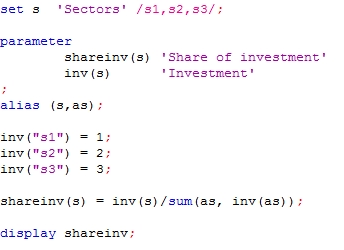
Calculating the share is not difficult thing, but you can make small
… Read the rest “Golden Rule 1: Display and use your intuition” How to update Gams and keeping an older version
Gams is often updated and sometimes it can be good to have the old version still around (especially if you are not sure if the new version is working properly or if you are trying the beta version and want to switch back to the old version).
What I usually do is the following:
- I rename the directory of my installed version to GamsOld
- Install the new version (directory “Gams”)
- That is almost all.
The advantages ares:
- first of all, I still have the older version around (I usually keep one older version and delete the others).
- As I work
Guidelines for Posting to the Gams Mailing List
The Gams mailing list can be very helpful. There are a lot of people who are willing to use their free time to answer your questions. My advice: subscribe to the mailing list at http://www.listserv.dfn.de/cgi-bin/wa?SUBED1=gams-l&A=1 ( and even if you don’t post to it, you can learn a lot of the questions and answers by others. If you post: don’t be afraid to ask a stupid question. The worst thing that can happen is that you get an answer like I once got. I asked a really stupid answer and got the answer: “Think”!
Tom Rutherford posted some nice guidelines … Read the rest “Guidelines for Posting to the Gams Mailing List”